

Graphic Design Freelance Work: How to Build Samples
Getting started with graphic design freelance work can feel difficult when you have no previous clients or professional projects to show. You may know how to create logos, social media posts, banners or brochures, but potential clients still want to see examples before trusting you with their work.
The good news is that you do not need paid projects to build a convincing graphic design portfolio. You can create practice designs, fictional brand identities, redesign concepts and personal projects that demonstrate your abilities. These samples give clients an idea of your design style, creativity and understanding of their requirements.
If you are a student, fresher, homemaker or someone planning to start working independently from home, building a small collection of relevant design samples is a practical first step. This guide explains which projects to create, how to present them, which tools to use and how to start looking for freelance opportunities in India and internationally.
Why Do Graphic Design Samples Matter for Freelancers?
When a business hires a freelance graphic designer, it usually wants to understand what the designer can deliver before discussing a project. A portfolio provides that proof.
A qualification or software certificate can show that you have completed training, but actual design samples demonstrate how you apply your knowledge.
For example, imagine that a small clothing business needs social media graphics for an upcoming sale. A designer who can show three attractive promotional posts is likely to make a clearer impression than someone who only lists Photoshop and Canva as skills.
Good samples help potential clients understand:
- Your design style and creative ability.
- Whether you can work with colours, typography and layouts.
- Which types of design projects you can handle.
- How well you understand branding and marketing requirements.
- Whether your work matches the type of project they need.
According to portfolio guidance published by Upwork, personal projects and mock-ups can also be used when you do not have paid client work. The important thing is to present your work honestly and choose samples that match the services you want to offer.
Can You Build a Graphic Design Portfolio Without Client Experience?
Yes. You can create a professional-looking beginner portfolio without having worked for a company or received payment from a client.
Start by treating each practice project as a small design assignment. Give yourself a fictional business, decide what that business needs and create designs that could realistically be used by that type of organisation.
For example, you could imagine a local bakery launching a new product range. Create a logo, product promotion, menu design and a few social media posts for that fictional brand.
This approach demonstrates more than your ability to use design software. It also shows that you understand how different visual materials work together.
Always identify fictional projects as concept work, personal projects or practice designs. Do not suggest that a real company hired you when it did not.
10 Graphic Design Sample Ideas for Beginners
If you are unsure what to include in your first portfolio, start with projects that businesses regularly need. You do not have to create all ten immediately. Choose the areas that interest you and develop a few strong examples.
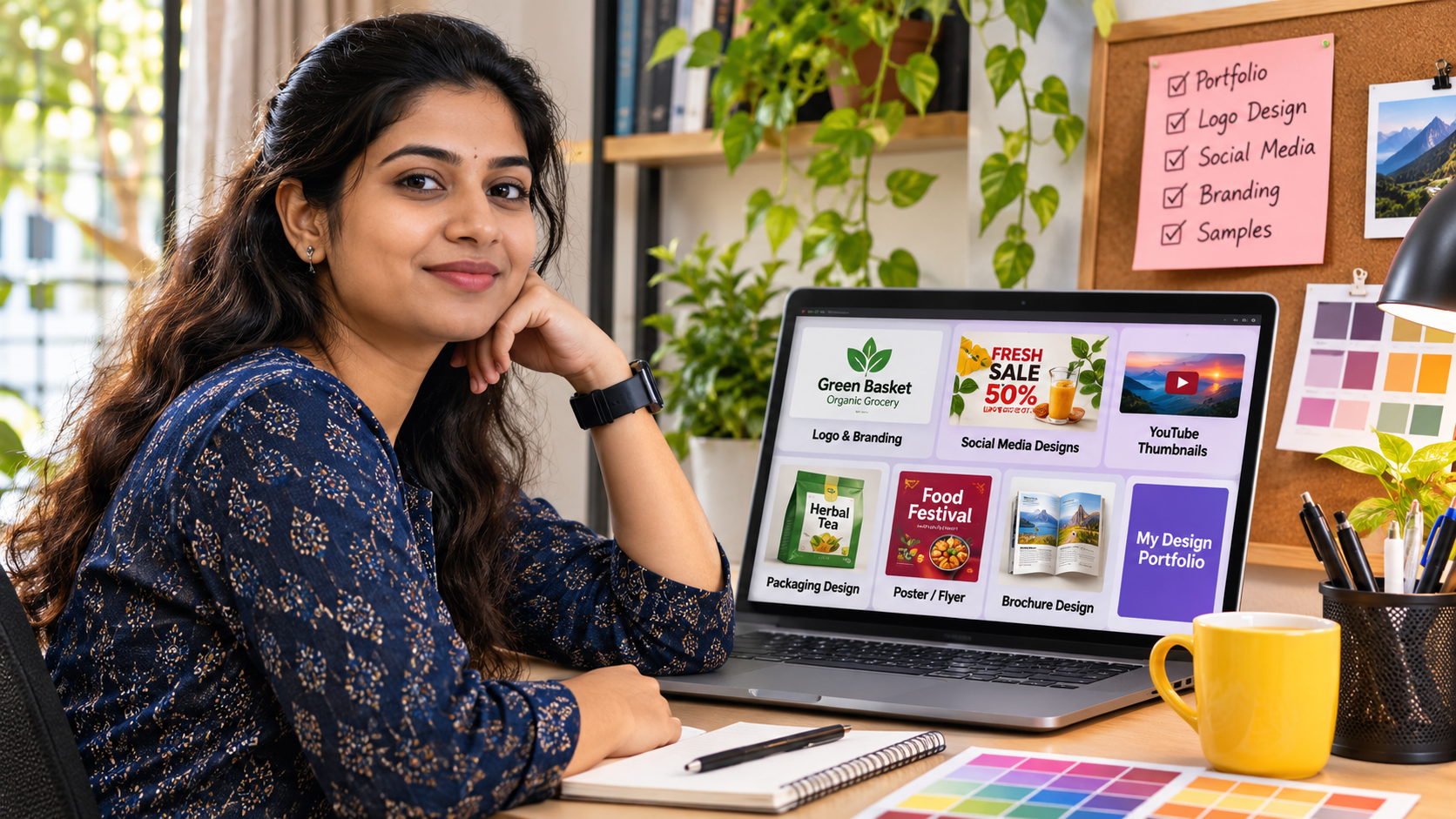
1. Logo Design and Brand Identity
Logo design is a useful starting point because it allows you to demonstrate your understanding of shapes, typography, colour combinations and brand recognition.
Create a fictional business and develop a small brand identity around it.
For example, imagine a brand called Green Basket that sells organic groceries. You could create:
- A primary logo.
- A simplified logo for smaller spaces.
- A brand colour palette.
- Two or three font combinations.
- A business card design.
- A simple packaging concept.
Present the designs together so visitors can see how the brand looks across different materials.
This type of sample is useful if you want to attract small businesses, startups and entrepreneurs looking for basic branding services.
2. Social Media Post Designs
Social media graphics are another practical portfolio choice. Shops, restaurants, coaches, educational businesses and online stores often need regular promotional content.
Create a fictional social media campaign for a business and prepare five or six matching designs.
Possible examples include:
- Product launch announcements.
- Festival greeting posts.
- Discount and promotional graphics.
- Instagram carousel designs.
- Educational tips and information posts.
- Event announcement graphics.
Try to maintain consistent colours, typography and visual style throughout the collection. This helps demonstrate that you can create a coordinated campaign rather than unrelated individual designs.
3. YouTube Thumbnail Designs
Many content creators need attractive thumbnails to represent their videos. This makes YouTube thumbnail design a useful skill to demonstrate in a beginner portfolio.
Create sample thumbnails for different fictional video topics, such as:
- Technology reviews.
- Cooking tutorials.
- Educational videos.
- Travel experiences.
- Personal finance lessons.
Focus on readable text, clear visual hierarchy and suitable image placement. A thumbnail should communicate the subject quickly without becoming overcrowded.
Include a few different styles to show that you can adapt your designs to different audiences.
4. Business Card and Stationery Design
Business cards and stationery are straightforward projects for practising professional layouts.
Create a fictional identity for a consultant, photographer, architect or small business owner. Design a matching business card, letterhead and email signature.
Pay attention to spacing, alignment, font sizes and readability. These details matter when designing materials that people will use for professional communication.
5. Poster and Flyer Designs
Posters and flyers allow you to practise arranging information in a limited space.
Choose a fictional event, such as a college workshop, music performance, fitness class or local food festival.
Create a poster containing:
- Event name and main message.
- Date, time and location.
- Relevant images or illustrations.
- Contact or registration information.
- A clear visual hierarchy.
Make sure the important details are easy to read. Attractive colours cannot compensate for information that is difficult to understand.
6. Brochure and Menu Design
Brochures and menus are good examples of multi-page or information-heavy design work.
You could create a three-fold brochure for a fictional travel agency or a restaurant menu for an imaginary cafe.
Use these projects to demonstrate:
- Organised content sections.
- Consistent typography.
- Appropriate image selection.
- Good use of white space.
- Readable layouts across multiple sections.
These samples can help you demonstrate your ability to work on print-oriented design assignments.
7. Product Packaging Design
Packaging design is useful if you want to work with e-commerce sellers, food businesses, beauty brands or retail companies.
Create a fictional product such as herbal tea, handmade soap, coffee or skincare packaging.
Show the front, back and side views of the package. You can also include a realistic product mock-up to help viewers understand how the design might look in use.
Remember that a packaging concept is not the same as a production-ready design. If you eventually offer professional packaging services, you will also need to understand print specifications, dielines, dimensions and file preparation.
8. Website Banner and Web Graphics
Online stores and business websites regularly use banners to highlight products, offers and important information.
Prepare a small collection of fictional website graphics for an online clothing store, electronics shop or educational website.
Try creating:
- Homepage hero banners.
- Product category banners.
- Sale announcement graphics.
- Website promotional sections.
- Simple advertising creatives.
Use suitable dimensions for the intended placement rather than stretching one design into every format.
9. Infographic Designs
Infographics help turn information into visual content. They are useful for educational websites, businesses, blogs and social media accounts.
For practice, create an infographic about healthy habits, basic computer skills or a simple step-by-step learning process.
Use headings, icons, charts and short explanations to organise the information. Make sure the content is accurate and that the visual elements make it easier to understand.
10. Festival and Seasonal Campaign Designs
Seasonal campaigns provide an opportunity to show your ability to create designs for specific occasions.
For an Indian audience, you could create fictional promotional campaigns for Diwali, Holi, Eid, Navratri or Independence Day. You could also prepare Christmas or New Year designs for international clients.
Include a matching set of social media posts, promotional banners and a simple advertisement. This demonstrates your ability to maintain a consistent design theme across different formats.
How to Build Graphic Design Samples Step by Step
Having project ideas is useful, but you also need a process for turning them into presentable portfolio pieces. The following approach works well for beginners.
Step 1: Decide Which Graphic Design Service You Want to Offer
Before creating samples, decide what kind of freelance work you want to attract.
Graphic design covers several different areas. Trying to learn everything at once can make it difficult to build a focused portfolio.
Choose one or two starting areas, such as:
- Logo and branding design.
- Social media graphics.
- YouTube thumbnails.
- Flyers and posters.
- Product packaging.
- Website graphics.
For example, if you want to work with small businesses, social media designs and basic branding samples may be a sensible combination.
Step 2: Create a Fictional Client Brief
Every sample should have a clear purpose. Instead of opening a design application and randomly creating graphics, prepare a short project brief.
For example:
- Business: A fictional home bakery.
- Target audience: Local customers and families.
- Project: Social media promotional campaign.
- Design requirements: Five promotional posts and one profile graphic.
- Visual direction: Warm colours, friendly typography and clear product photographs.
This gives you a realistic starting point and helps you make design decisions with a specific audience in mind.
Step 3: Research Before Designing
Look at how similar businesses present their products and services. Study their colour combinations, layouts, typography and visual communication.
You can use existing designs for research and inspiration, but do not copy another designer’s work. Your sample should be your own original creation.
Think about what the fictional business needs to communicate and how your design can help deliver that message.
Step 4: Create the First Version
Start with a simple layout. Focus on the main message, readable typography and suitable colour combinations.
Do not add too many decorative elements. A clean design with a clear message is often more effective than a complicated layout.
Once the first version is ready, review it carefully. Check alignment, spacing, contrast, spelling and image quality.
Step 5: Prepare Different Design Variations
Professional projects sometimes require multiple versions of the same design.
For example, a promotional graphic may need a square social media version, a vertical story version and a website banner.
Create a few variations to demonstrate that you can adapt a design to different placements while maintaining its overall identity.
Step 6: Present the Design Professionally
Do not simply upload a collection of unrelated image files. Arrange your work into a neat presentation.
Use mock-ups where appropriate to show how a logo might appear on packaging, how a poster might look on a wall or how a social media design would appear on a phone screen.
Make sure the original artwork is also available where relevant. A mock-up should support your design presentation, not hide the actual work.
Step 7: Write a Short Project Description
Every portfolio item should have a short explanation.
Include the following information:
- Project name.
- Whether it is a personal or fictional concept.
- The design problem or objective.
- Your role in creating the design.
- Tools used.
- The final deliverables.
This helps clients understand the thinking behind your work instead of seeing only the finished image.
Free and Beginner-Friendly Tools for Creating Design Samples
You do not need to purchase expensive software immediately. Several design applications and portfolio platforms can help you practise and present your work.
- Canva: Useful for social media graphics, presentations, simple promotional designs and beginner projects. Check the current licensing terms before using individual assets commercially.
- GIMP: A free, open-source image editor suitable for practising photo editing and image manipulation.
- Inkscape: A free vector graphics editor that can be used for illustrations, logos and scalable artwork.
- Adobe Photoshop: A professional image editing application useful for photo manipulation, digital artwork and graphic compositions. It is a paid product.
- Adobe Illustrator: A vector design application commonly used for logos, icons, illustrations and branding materials. It is also a paid product.
Choose software according to the services you want to provide. Learning one or two applications properly is more useful than installing several tools without developing practical skills.
Where Should You Display Your Graphic Design Samples?
After creating your first projects, choose a place where potential clients can view them easily.
Behance
Behance is a creative portfolio platform where designers can publish projects and present their work to a wider audience.
It is particularly useful for displaying branding projects, illustrations, social media campaigns and detailed design presentations.
Dribbble
Dribbble is another platform where designers can showcase visual work and explore creative projects.
It can be useful for displaying individual design concepts, illustrations, interface graphics and other visual samples.
Personal Portfolio Website
A personal website gives you more control over how your projects are organised and presented.
You can create separate sections for branding, social media design, print materials and other services. You can also include an introduction, contact details and information about your working process.
A website is not essential when you are starting. A well-organised online portfolio or PDF can be enough to begin approaching potential clients.
Upwork and Other Freelance Platforms
Upwork allows freelancers to create profiles and showcase relevant work samples to prospective clients.
You can also explore Fiverr, where graphic designers can present specific services to potential buyers.
Platform availability, account requirements, competition and fees can vary. Review the latest terms before registering or purchasing any optional services.
How Many Samples Should a Beginner Include?
You do not need dozens of projects to launch your first portfolio. Start with around five to seven carefully selected projects that demonstrate the services you want to offer.
For example, a beginner interested in social media and branding could prepare:
| Sample project | What it demonstrates |
|---|---|
| Logo and brand identity | Typography, colours and branding |
| Social media campaign | Layout and promotional design |
| YouTube thumbnails | Visual hierarchy and image editing |
| Business card | Professional print layout |
| Festival campaign | Creative consistency and adaptation |
| Website banner | Digital advertising graphics |
These are suggested starting points, not a fixed requirement. If you want to specialise in packaging design, for example, you should prioritise packaging projects instead of filling your portfolio with unrelated samples.
How to Find Graphic Design Freelance Work in India
Once your portfolio is ready, start looking for small projects that match your current abilities.
Beginners should focus on building experience gradually rather than expecting large projects immediately.
1. Explore Freelance Platforms
Register on suitable freelance marketplaces and create a profile that clearly explains your services.
Look for project descriptions related to your strongest samples. If you have created social media graphics, search for social media design assignments instead of applying for complex branding or animation projects that you cannot yet handle.
2. Approach Small Businesses
Local businesses can be a useful place to start building professional relationships.
Consider approaching small cafes, clothing stores, coaching centres, home businesses and online sellers. Introduce your services and share a few relevant samples.
Avoid sending generic messages to everyone. A short, personalised introduction explaining how you could help with a particular design requirement is more professional.
3. Use LinkedIn to Build Professional Connections
LinkedIn can help you connect with business owners, marketing professionals, startup founders and other designers.
Share selected portfolio projects and explain what you created. You can also follow businesses and look for publicly advertised freelance opportunities.
4. Create a Professional Freelance Profile
Your profile should make it easy for clients to understand what you offer.
Include:
- A clear professional introduction.
- Your main graphic design services.
- Relevant software skills.
- A link to your portfolio.
- Your preferred project types.
- Professional contact information.
Do not claim years of experience, client results or professional qualifications that you do not have.
How to Apply for Your First Graphic Design Project
When you find a suitable freelance assignment, read the requirements carefully before contacting the client.
A useful proposal should explain why your skills match the project and include relevant samples.
For example, if a business needs Instagram promotional graphics, share two or three social media samples rather than sending an entire portfolio of unrelated work.
Your message can follow this simple structure:
- Introduce yourself briefly.
- Mention the design requirement you understand.
- Explain how you can approach the assignment.
- Share relevant samples.
- Ask any necessary questions about the brief and deliverables.
Before accepting the assignment, clarify the number of designs, required dimensions, deadlines, revisions, payment terms and ownership of the final files.
How to Price Your First Freelance Graphic Design Project
Pricing can be confusing when you have not worked with clients before. There is no single rate that applies to every graphic design assignment.
The amount you charge depends on several factors, including:
- Project complexity.
- Time required to complete the work.
- Your current skill level.
- Number of design variations.
- Revision requirements.
- Client location and project budget.
- Commercial usage and deliverables.
For example, creating one simple social media graphic is different from developing a complete brand identity with multiple design applications.
Before quoting a price, understand the full scope of work. If you are unsure about pricing, research comparable assignments on freelance platforms and calculate the time and effort involved.
Never promise unlimited revisions or agree to an unclear scope simply to secure your first project.
Common Mistakes to Avoid When Building Design Samples
Many beginners spend considerable time creating portfolio projects but overlook the way clients actually review them.
Avoid these common mistakes:
- Adding too many unrelated designs: A focused portfolio makes it easier for clients to understand your services.
- Copying other designers: Use references for learning, but create original designs.
- Using too many fonts: Keep typography readable and consistent.
- Ignoring spelling and alignment: Small mistakes can make an otherwise good design look unfinished.
- Showing only mock-ups: Include the original artwork as well as presentation images.
- Claiming fictional work as paid client work: Label practice projects honestly.
- Using unlicensed images or fonts: Check commercial usage rights before including assets in client work.
- Applying for every available project: Focus on assignments that match your current abilities.
- Ignoring client requirements: A visually attractive design is not useful if it fails to meet the brief.
How to Avoid Freelance Graphic Design Scams
People looking for their first online design project can encounter fake recruitment offers and suspicious clients. Be careful when someone promises unusually high payments for very little work.
Watch for these warning signs:
- A client asks you to pay a registration or security fee before receiving work.
- Someone guarantees freelance projects after purchasing an expensive training package.
- A supposed employer requests your banking password, OTP or other confidential information.
- A client sends suspicious links or asks you to install unknown software.
- Someone asks you to complete a large amount of unpaid work as a condition of getting hired.
- A recruiter uses a genuine company’s name but communicates through an unverified account.
Verify the identity of clients and companies before sharing personal information. Keep written records of project requirements, payment arrangements and agreed deliverables.
Never pay someone simply to obtain a freelance job. If a payment or client arrangement seems suspicious, stop and verify it before proceeding.
A Simple 30-Day Plan to Build Your First Graphic Design Portfolio
If you are unsure where to begin, use the following four-week plan. Adjust the schedule according to your existing skills and available time.
| Week | What to do | Expected progress |
|---|---|---|
| Week 1 | Choose your design specialisation, practise basic layouts and study design principles. | Clear direction and initial concepts. |
| Week 2 | Create logo, social media and promotional design samples. | Three or four practice projects. |
| Week 3 | Develop additional samples, refine existing designs and write project descriptions. | A more complete portfolio collection. |
| Week 4 | Publish your portfolio, prepare your freelance profile and begin contacting potential clients. | A portfolio ready for freelance applications. |
You do not need to become an expert in 30 days. The purpose of this plan is to create a practical starting point and develop a regular design practice.
Final Thoughts
Starting graphic design freelance work does not have to depend on finding your first paying client. You can begin by creating original samples that demonstrate your design abilities and the services you want to offer.
Focus on a few practical project types, present your work professionally and explain the purpose behind each design. Once your portfolio is ready, start approaching suitable clients and applying for smaller assignments.
Your first portfolio will not be perfect, and that is fine. Keep improving your designs, learn from feedback and replace weaker samples as your skills develop. A clear, honest and relevant portfolio gives you a practical foundation for building a freelance graphic design career.
Explore more opportunities in freelance jobs and learn about other work-from-home opportunities for beginners on CareerMala.